FACT24 ENS+
Release Notes
Portal Version 3.31
Portal Version 3.30
Portal Version 3.29
Portal Version 3.28
Portal Version 3.27
Portal Version 3.26
Portal Version 3.25
Portal Version 3.24
Portal Version 3.23
Portal Version 3.22
Portal Version 3.21
Portal Version 3.20
Portal Version 3.19
Portal Version 3.18
Portal Version 3.17
Portal Version 3.16
Portal Version 3.15
Portal Version 3.14
Portal Version 3.13
Portal Version 3.12
Portal Version 3.11
Portal Version 3.10
Portal Version 3.9
Portal Version 3.8
Portal Version 3.7
Portal Version 3.6
Portal Version 3.5
Portal Version 3.4
Portal Version 3.3
Portal Version 3.0
Portal Version 3.2
Getting started
Setup
Managing ENS+ users
Creating your organizational structure
Caller IDs
Address registry
Categories
Dictionary
File manager
Download Center
Your Account
Two-factor authentication (2FA)
Configuration
Persons & Groups
Alarm configuration
Alarms
Launch Forms - Configuration
Message templates
Calendar
Location profiles
Geolocation profiles
Whitelists
Jobs
Events
Telephone quickstarts
Survey
Alarm Templates
Alarm Flow
Interfaces
Operating Cockpit
Alarm Cockpit
Activate and stop alarm
Launch Forms - Trigger
Ad hoc alarm
Alarm monitor
Chat
Phone Conference
Video Conference
Surveys
Reports & Statistics
Loneworking
FACT24 Mediagateway
Microsoft Teams Bot
Web login for persons
Add-on modules
FACT24 ENS+ Incident Management
Telekom Settings Cloud of Things Narrow Band Interface
FACT24 ENS+ External API (REST) – Functionality Scope
FACT24 AI
Migration to ENS+
FACT24 CIM
Release Notes
New functions through FACT24 CIM release V.26.02
New functions through FACT24 CIM release V.26.01
New functions through FACT24 CIM release V.25.03
New functions through FACT24 CIM release V.25.02.01
New functions through FACT24 CIM release V.25.02
New functions through FACT24 CIM release V.25.01
New functions through FACT24 CIM release V.24.03
New functions through FACT24 CIM release V.24.02
New functions through FACT24 CIM release V.24.01
New functions through FACT24 CIM release V.23.02
New functions through FACT24 CIM release V.23.01
Getting started
FACT24 CIM starter - crucial steps
FACT24 CIM essential
FACT24 CIM advanced
Introduction
Start Page
Admin workspace
The FACT24 CIM Roles
New Navigation
Search
Levels
Contacts
Locations
Home - workspaces
Situation
Manage
Communicate
Document & report
Prepare & prevent
Mobile App (FACT24 ENS+ and CIM)
App Releases
App-Version 3.30
App-Version 3.28
App Version 3.26
App Version 3.24
App Version 3.22
App Version 3.21
App Version 3.20
App Version 3.17
App Version 3.16
App Version 3.15
App Version 3.13
App Version 3.12
App Version 3.10
App Version 3.9
App Version 3.8
App Version 3.7
App Version 3.5
App Version 3.3
App Version 3.2
Download & Basics
FACT24 ENS+ App Section
Basics and Login
General Settings
Account
Location Services
Group Management
Triggering Alarms
Editing Alarms
Active Alarms
Chat in the ENS+ Application
History
Reports
Emergency Plans
Lone Worker Protection
Special Smartphones
FACT24 CIM App Section
Support
Table of Contents
- All Categories
- Mobile App (FACT24 ENS+ and CIM)
- App Releases
- App-Version 3.28
App-Version 3.28

Improvements for all FACT24 Editions: (available from 01.06.2026)
New Icon Design
The FACT24 ENS+ and CIM App now uses an updated icon set, aligned with the latest ENS+ cloud design.
This gives the app a more modern and consistent visual appearance across mobile and web interfaces.
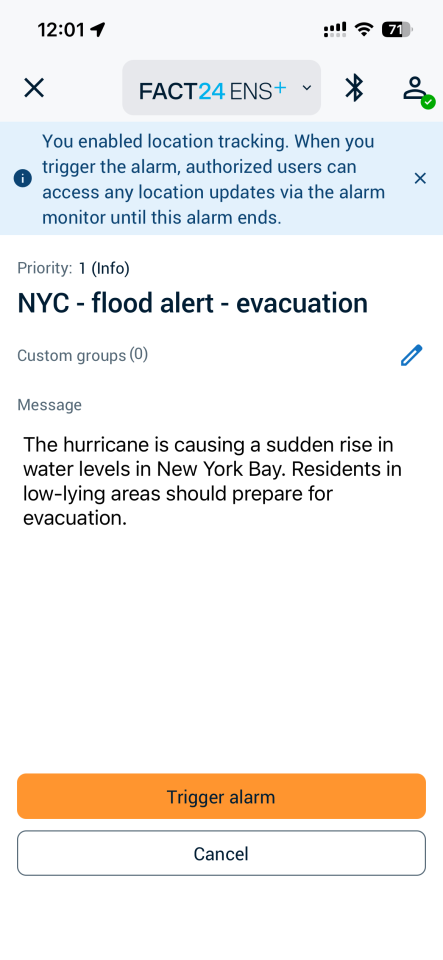
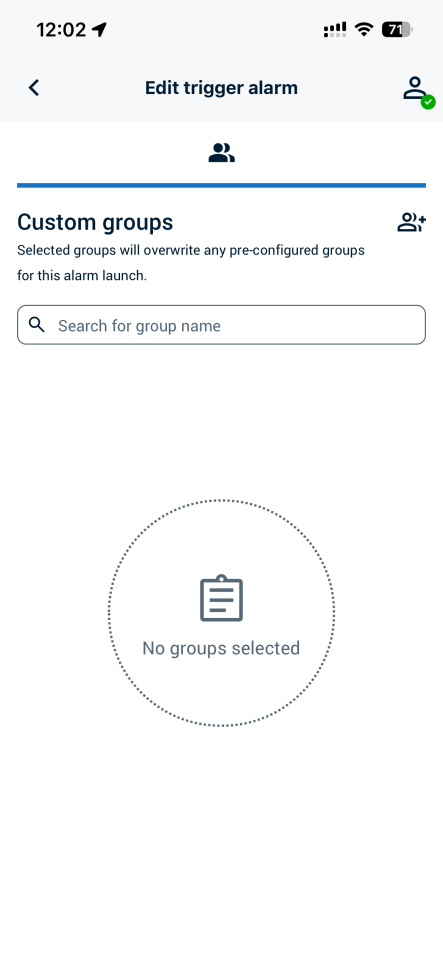
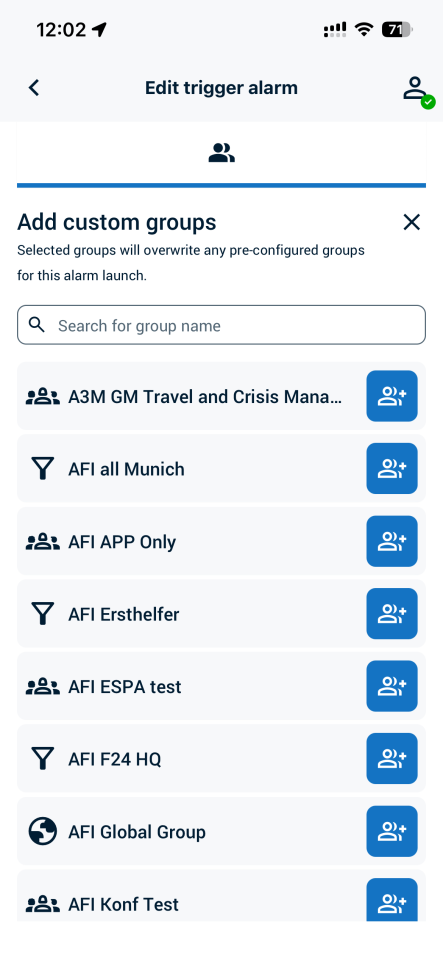
Updated User Interface for adding groups by alarm triggering
The app now offers a redesigned mobile interface for adding custom groups during alarm triggering.
Instead of using the previous large button, users can now access this function via a blue pencil icon on the right side of the screen.
Why it matters
This is a small part of a larger UI initiative aimed at providing an easy-to-use, consistent user interface in the App.
How it works
- On the alarm triggering screen, tap the blue pencil icon on the right side.
- A new page opens, tap the group icon with the plus sign to select additional groups.
- After selecting the required groups, tap the X icon at the top of the page to return to the previous screen.
 |  |  |
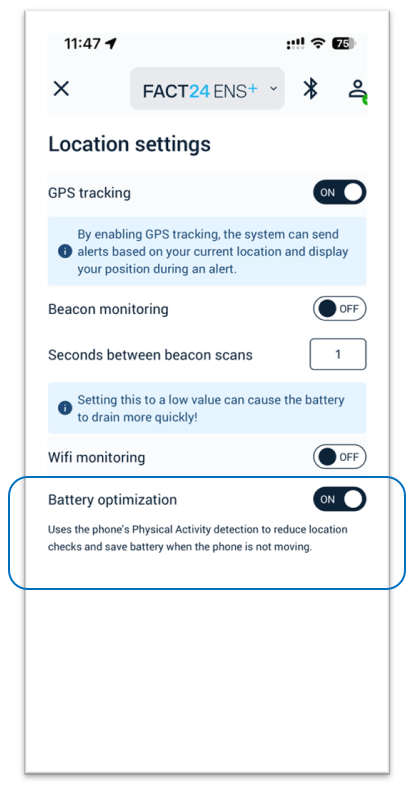
Reduce Battery Use with Activity-Based Location Tracking
FACT24 now supports activity recognition for location tracking in the mobile app.
When enabled, the app can detect whether the phone is moving or stationary.
If the phone is not moving, the app reduces unnecessary location updates to the cloud, helping to lower battery consumption while still supporting location-based safety features.
Why it matters
This enhancement is especially relevant for features that rely on continuous or background location tracking, such as location-based alarms, alarms that require the responder’s location, and Lone Worker mode.
Real-world example
A field employee activates Lone Worker mode at the start of a shift. While moving between different locations, ENS+ regularly updates the employee’s position. Later, when the employee remains at the same site for an extended period, activity recognition detects that the phone is stationary and reduces location updates. This helps preserve battery while keeping location-based safety features available when needed.
User controlled activation
To use activity-based location tracking, users must enable the feature in the FACt24 ENS+ and CIM app under Location settings and grant the required permission.
Availability may depend on the mobile operating system and device permission settings.
Login Session Expiry Reminder
If the app is not used, the login session expires after 30 days.
If the app is used regularly, the session can remain valid for up to 365 days, after which the user must log in again.
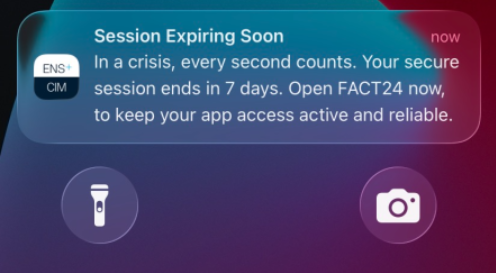
FACT24 now helps users keep their mobile app session active by sending a reminder before the login session expires.
Seven days before expiry, users receive a push notification asking them to open the app and confirm that their session should remain active.
With one tap on the notification, the app is activated and the session validity is extended by another 30 days.
Why it matters
- Helpful if the app is rarely used: Many users install the app but may not open it regularly because emergency situations are rare. The reminder helps them stay ready.
- Simple session extension: Users do not need to search for the app or complete a complex process. Tapping the push notification is enough to activate the app and extend the session.
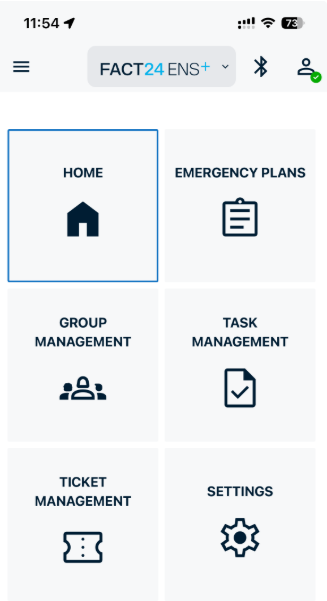
Show All Assigned Incident Tasks
This enhancement is available for editions that include Incident Management and the mobile Task Management functionality.
The FACT24 ENS+ and CIM app now makes it easier for mobile users to review their assigned incident tasks.
In addition to filtering tasks by individual status, users can now select All to see every task assigned to them in one combined view.