FACT24 ENS+
Release Notes
Portal Version 3.31
Portal Version 3.30
Portal Version 3.29
Portal Version 3.28
Portal Version 3.27
Portal Version 3.26
Portal Version 3.25
Portal Version 3.24
Portal Version 3.23
Portal Version 3.22
Portal Version 3.21
Portal Version 3.20
Portal Version 3.19
Portal Version 3.18
Portal Version 3.17
Portal Version 3.16
Portal Version 3.15
Portal Version 3.14
Portal Version 3.13
Portal Version 3.12
Portal Version 3.11
Portal Version 3.10
Portal Version 3.9
Portal Version 3.8
Portal Version 3.7
Portal Version 3.6
Portal Version 3.5
Portal Version 3.4
Portal Version 3.3
Portal Version 3.0
Portal Version 3.2
Getting started
Setup
Managing ENS+ users
Creating your organizational structure
Caller IDs
Address registry
Categories
Dictionary
File manager
Download Center
Your Account
Two-factor authentication (2FA)
Configuration
Persons & Groups
Alarm configuration
Alarms
Launch Forms - Configuration
Message templates
Calendar
Location profiles
Geolocation profiles
Whitelists
Jobs
Events
Telephone quickstarts
Survey
Alarm Templates
Alarm Flow
Interfaces
Operating Cockpit
Alarm Cockpit
Activate and stop alarm
Launch Forms - Trigger
Ad hoc alarm
Alarm monitor
Chat
Phone Conference
Video Conference
Surveys
Reports & Statistics
Loneworking
FACT24 Mediagateway
Microsoft Teams Bot
Web login for persons
Add-on modules
FACT24 ENS+ Incident Management
Telekom Settings Cloud of Things Narrow Band Interface
FACT24 ENS+ External API (REST) – Functionality Scope
FACT24 AI
Migration to ENS+
FACT24 CIM
Release Notes
New functions through FACT24 CIM release V.26.02
New functions through FACT24 CIM release V.26.01
New functions through FACT24 CIM release V.25.03
New functions through FACT24 CIM release V.25.02.01
New functions through FACT24 CIM release V.25.02
New functions through FACT24 CIM release V.25.01
New functions through FACT24 CIM release V.24.03
New functions through FACT24 CIM release V.24.02
New functions through FACT24 CIM release V.24.01
New functions through FACT24 CIM release V.23.02
New functions through FACT24 CIM release V.23.01
Getting started
FACT24 CIM starter - crucial steps
FACT24 CIM essential
FACT24 CIM advanced
Introduction
Start Page
Admin workspace
The FACT24 CIM Roles
New Navigation
Search
Levels
Contacts
Locations
Home - workspaces
Situation
Manage
Communicate
Document & report
Prepare & prevent
Mobile App (FACT24 ENS+ and CIM)
App Releases
App-Version 3.30
App-Version 3.28
App Version 3.26
App Version 3.24
App Version 3.22
App Version 3.21
App Version 3.20
App Version 3.17
App Version 3.16
App Version 3.15
App Version 3.13
App Version 3.12
App Version 3.10
App Version 3.9
App Version 3.8
App Version 3.7
App Version 3.5
App Version 3.3
App Version 3.2
Download & Basics
FACT24 ENS+ App Section
Basics and Login
General Settings
Account
Location Services
Group Management
Triggering Alarms
Editing Alarms
Active Alarms
Chat in the ENS+ Application
History
Reports
Emergency Plans
Lone Worker Protection
Special Smartphones
FACT24 CIM App Section
Support
Table of Contents
- All Categories
- FACT24 CIM
- Release Notes
- New functions through FACT24 CIM release V.26.02
New functions through FACT24 CIM release V.26.02

We are happy to announce improvements with the following new features concerning FACT24 CIM. To provide you with a better overview, we have set up this article to give you a detailed description of the updates with screenshots. These functionalities will be available to you from 27th of August 2026 on. Space
A New Navigation Experience
To make working in FACT24 CIM even more intuitive, we are introducing a completely redesigned navigation structure.
The new menu has been organized around users' daily workflows, making it faster and easier to find the functionality you need.
Find out here where to find each FACT24 CIM feature in the new navigation menu
New Meeting module
The new Meeting module in FACT24 CIM is designed to help you prepare, schedule, and conduct meetings directly within FACT24 CIM.
The new module supports the entire meeting process, from creating reusable templates and inviting attendees to scheduling recurring meetings and conducting the meeting.
Find out more about the new meetings module here
Start a Teams Meeting from Chat
If a FACT24 CIM Chat requires a live meeting, there is no need to leave FACT24 CIM or set up the meeting separately.
Find out how to start a Microsoft Teams meeting from within the chat here
Start a Teams Meeting from Messages
You can now add a Microsoft Teams meeting directly to a message in FACT24 CIM.
Find out how to add a Microsoft Teams invitation link to a message here
Add FACT24 CIM Variables to FACT24 ENS+ Alarm Messages
When configuring a FACT24 ENS+ alarm, you can now include FACT24 CIM incident variables directly in the alarm message.
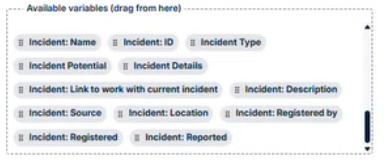
The available variables can be easily added to the message using drag and drop. This allows you to automatically include relevant information from the current FACT24 CIM incident in your alarm communication.
Please note: FACT24 CIM variables are only available when the FACT24 ENS+ alarm is initiated from within an active FACT24 CIM incident.