Table of Contents
- Release Notes Portal Version 3.31.0 (available from September 24th 2026 on)
- Improvements for all FACT24 Editions
- Organisation Unit and Scope Information in User Exports
- Clearer Presentation of Snapshot Data in Enterprise Usage Exports
- Three New Alerting languages: Czech, Turkish, Polish
- Two-Factor Authentication via Authenticator App(s)
- F24 Caller IDs Available for Alarms
- Include Custom Person Properties in Alarm Reports
- Improvements for FACT24 Creolytix Customers
- Improvements for Customers with the Launch Forms Add-On
Portal Version 3.31

- Release Notes Portal Version 3.31.0 (available from September 24th 2026 on)
- Improvements for all FACT24 Editions
- Organisation Unit and Scope Information in User Exports
- Clearer Presentation of Snapshot Data in Enterprise Usage Exports
- Three New Alerting languages: Czech, Turkish, Polish
- Two-Factor Authentication via Authenticator App(s)
- F24 Caller IDs Available for Alarms
- Include Custom Person Properties in Alarm Reports
- Improvements for FACT24 Creolytix Customers
- Improvements for Customers with the Launch Forms Add-On
Release Notes Portal Version 3.31.0 (available from September 24th 2026 on)
Improvements for all FACT24 Editions
Organisation Unit and Scope Information in User Exports
User exports in CSV and XLSX format now include two additional columns:
- The user’s organisational unit
- The scope assigned to the user’s active FACT24 ENS+ role
This additional information makes it easier to review users’ organisational assignments and access scopes outside FACT24 ENS+.

You can find more information about user exports here
Clearer Presentation of Snapshot Data in Enterprise Usage Exports
The Your Account page under Setup provides an overview of how an account uses FACT24 ENS+, including the number of alarms triggered, persons notified, SMS messages sent, and phone calls made.
This information can also be exported to Excel for a selected reporting period.
While most values in the report represent activity recorded during the selected period, the following two values are snapshots:
- Number of registered persons
- Number of allowed notifiable persons
These values represent the status of the account on the date the report was generated and are not aggregated over the selected reporting period.
To make this distinction clearer, both snapshot values have been moved to the end of the Excel report and are separated from the period-based values by an empty column.
An explanatory note at the bottom of the report now also states the snapshot date and clarifies that all other values refer to the selected reporting period.

You can find more information about Enterprise Usage here
Three New Alerting languages: Czech, Turkish, Polish
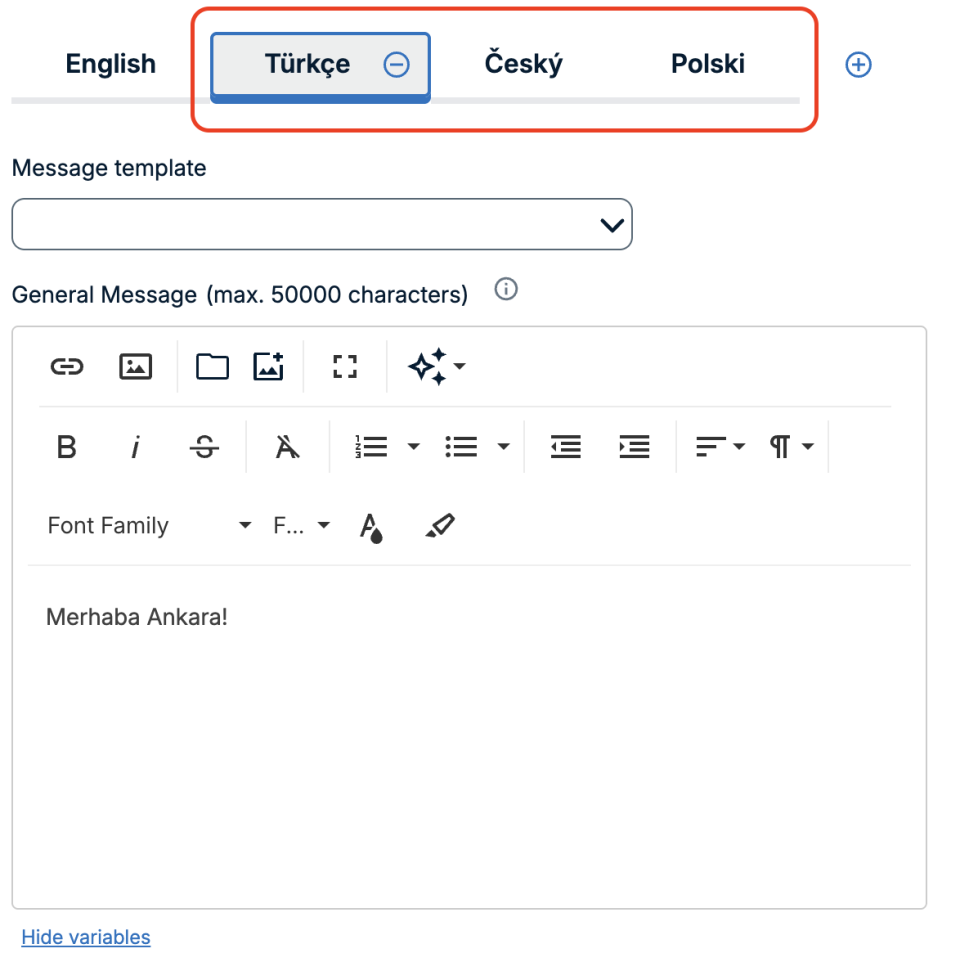
FACT24 ENS+ now supports three additional alerting languages:
- Czech
- Turkish
- Polish
This allows alarm messages to reach even more people in their preferred language.
Users can select the relevant alerting language when configuring an alarm.
You can find more information about alarm messages here
Two-Factor Authentication via Authenticator App(s)
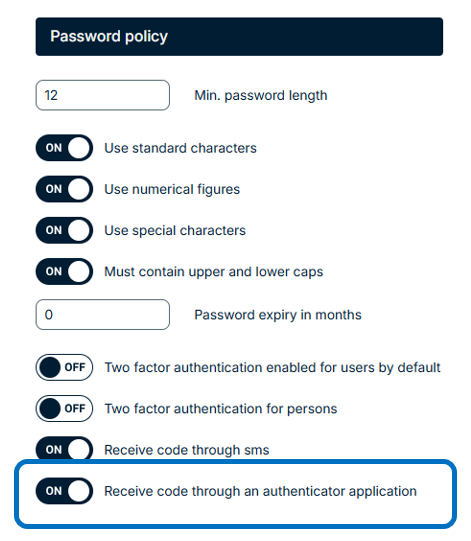
FACT24 ENS+ now offers an additional option for two-factor authentication (2FA).
In addition to receiving the second authentication factor via SMS, users can now authenticate using an Authenticator App.
When setting up an Authenticator App for the first time, the user receives an OTP via SMS to access a QR code. The QR code can then be scanned with an Authenticator App to complete the setup.
Once the setup is complete, recovery codes are provided and should be stored securely in case the user loses access to their device.
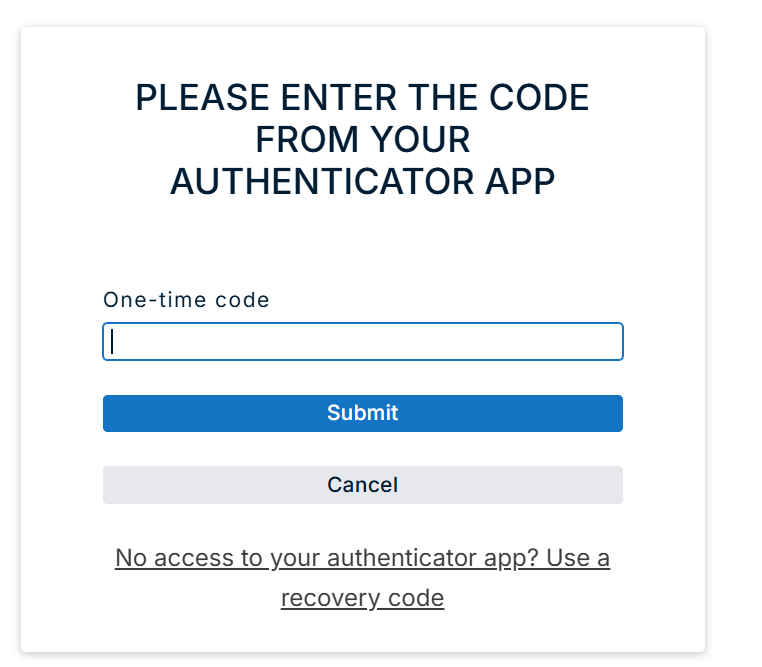
For subsequent logins, the authentication code generated by the Authenticator App can be used as the second factor.
The Authenticator App configuration can be reset in the user's settings if required.
You can find more information about two-factor authentication here
F24 Caller IDs Available for Alarms
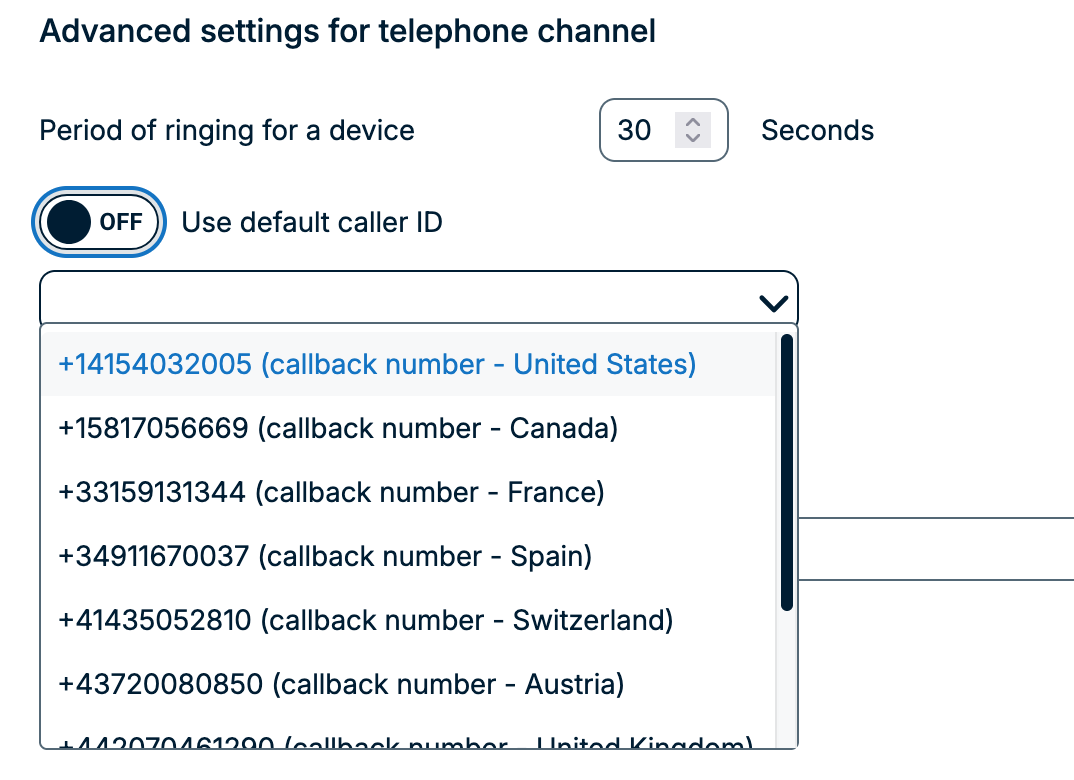
FACT24 ENS+ now gives customers the option to use predefined F24-owned caller IDs for phone alarms. This can make incoming alarm calls easier for recipients to recognise.
The enhancement includes:
- More familiar caller IDs: Customers can select from available F24-owned callback numbers, including numbers for the UK, Spain, Germany, Austria, France, Canada, Switzerland, Colombia and the USA.
- Configuration per organisational unit: Administrators can assign available caller IDs to individual organisational units before they are used for alarms.
- Selection within alarm settings: Available numbers can be selected under Audience and channels → Advanced audience and channel settings.
- Existing defaults remain available: Users can continue to use the default phone number where required.
- Easy selection: Caller IDs can be found by searching for the relevant phone number in the selection list.
- Available for portal and mobile workflows: The configured caller ID applies to phone alarms triggered through supported FACT24 ENS+ workflows.
You can find more information on caller IDs here
Include Custom Person Properties in Alarm Reports
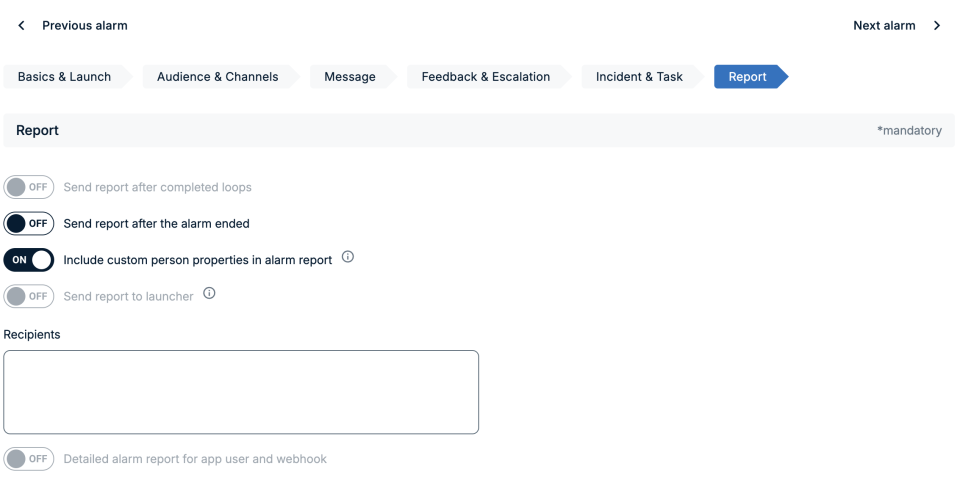
FACT24 ENS+ now supports including custom person properties in alarm reports, providing organisations with additional relevant information alongside standard person details.
The enhancement includes:
- Configurable per alarm: Administrators can enable the new Include custom person properties in alarm report option in the Report section of the alarm configuration.
- Included in exported reports: Custom properties are added as additional columns in CSV and XLSX exports, positioned after Job title and Qualification.
- Optional for optimised performance: Custom properties are included only when the option is explicitly enabled. PDF exports are not affected.
You can find more information on alarm reports here
Improvements for FACT24 Creolytix Customers
Manage FACT24 Creolytix Roles via the REST API
In the previous release, we introduced the option to configure a user's FACT24 Creolytix role directly on the FACT24 ENS+ user page, alongside their FACT24 ENS+ and FACT24 CIM roles.
With Portal Version 3.31.0, Creolytix roles can now also be managed through the ENS+ REST API.
The user endpoint has been extended as follows:
- GET returns the Creolytix role assigned to a user.
- PUT and PATCH allow the Creolytix role to be assigned or updated.
This enhancement enables organisations to manage FACT24 Creolytix user roles through automated integrations as well as through the FACT24 ENS+ user interface.
Improvements for Customers with the Launch Forms Add-On
Improved Launch Forms
Launch Forms in FACT24 ENS+ have been enhanced to guide users through the alarm-triggering process step by step.
Instead of completing one long questionnaire, users can now move through multiple pages, with subsequent steps adapting dynamically based on their previous answers. This helps users provide the right information and trigger the appropriate alarm for the situation.
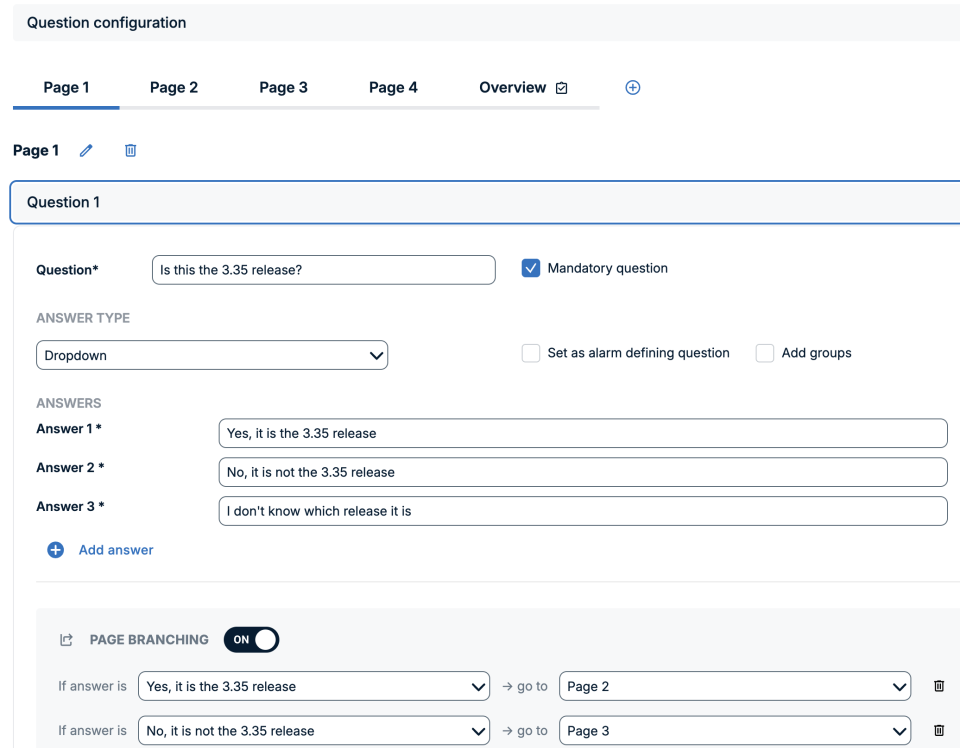
The improved Launch Forms provide:
- More flexible workflows: Different answers can lead to different subsequent questions and alarms, supporting more complex operational scenarios.
- Clearer alarm messages: Each page can contain its own message content. The information provided throughout the Launch Form is automatically combined into the final alarm message, with the option to add a header and footer.
- A consistent experience across channels: The portal and newer versions of the mobile app support the paged workflow, while existing mobile app integrations remain supported without requiring changes.
Example: A security team can use a single Launch Form for several incident types. If a user selects “Building evacuation,” they can be guided through evacuation-specific questions. Selecting “IT outage” can instead lead to a completely different set of questions and alarm configurations.
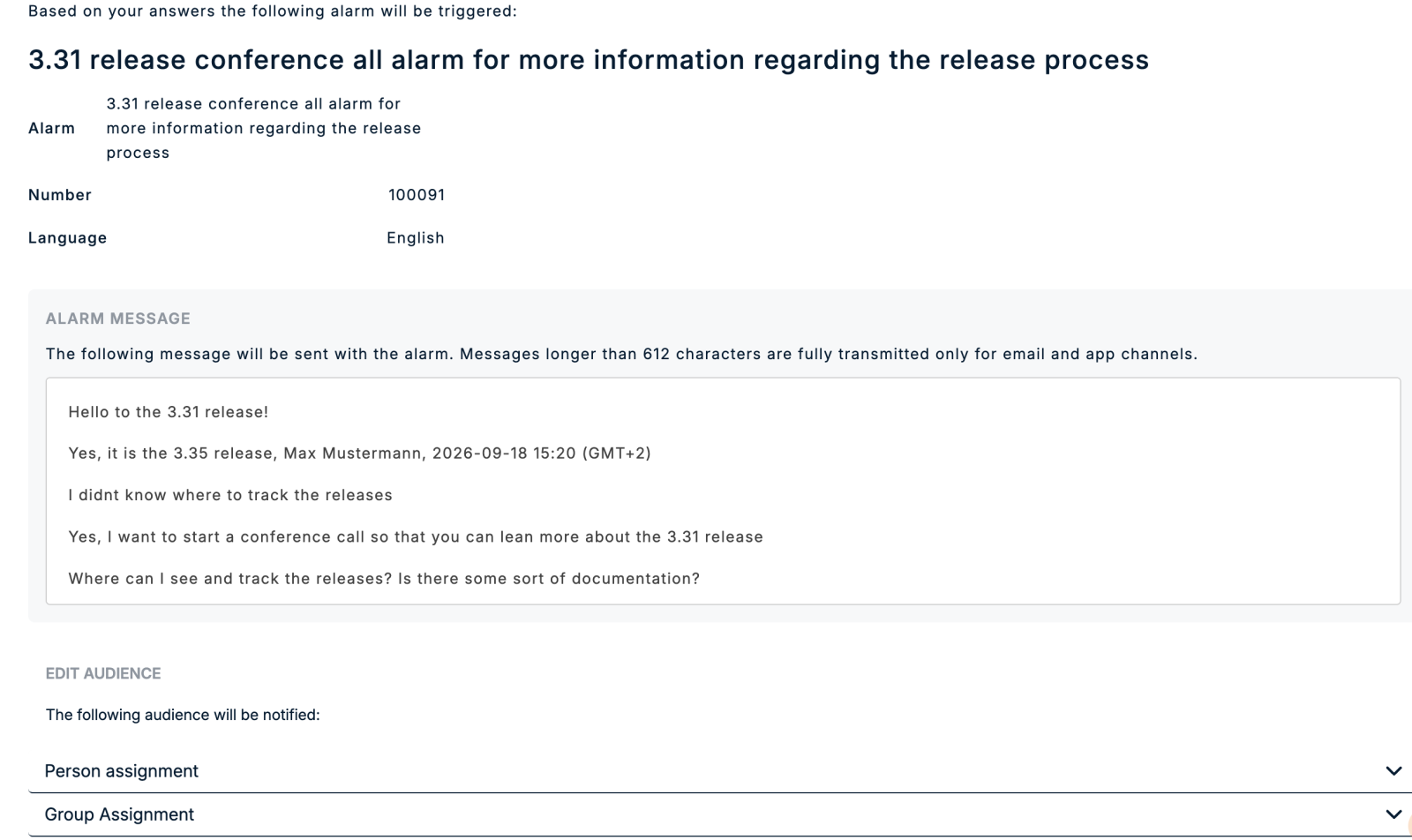
The improved Launch Forms also provide users with an overview before the alarm is triggered.
On this page, users can review the selected alarm and the final alarm message generated from their Launch Form responses. They can also add additional persons or groups to the audience before triggering the alarm.
This provides:
- Greater flexibility during live incidents: Users can adapt the audience to the specific situation without changing the underlying alarm configuration.
- Faster responses to unexpected situations: Additional teams or individuals can be included immediately when their involvement becomes necessary.
- Availability in portal and mobile: An Additional Audience section is included in the alarm confirmation flow.
You can find more information on Launch Forms here
Launch Forms Now Available in the Web Client
Users can now start alarms based on Launch Forms directly from the FACT24 ENS+ web client.
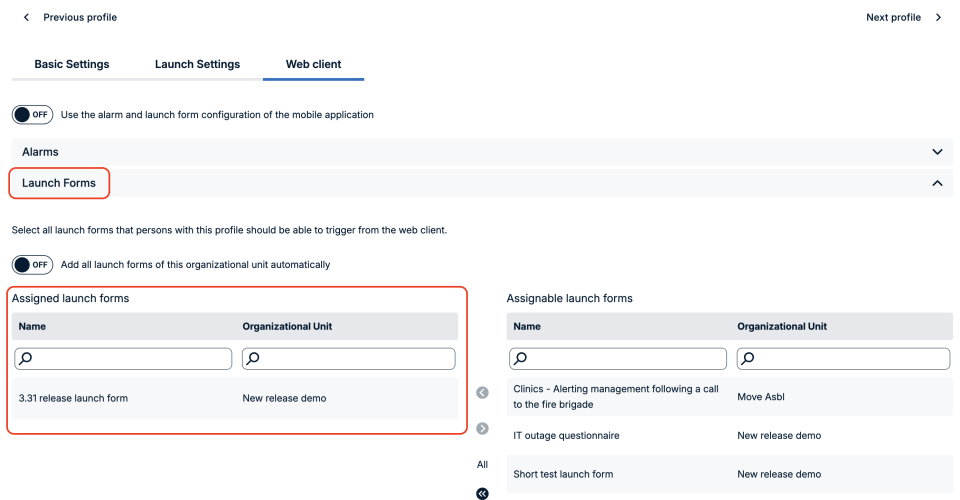
Users can assign Launch Forms to the Web Client within a profile, using the same familiar assignment approach already available for alarms. Launch Forms assigned to a user appear in the Start Alarm panel alongside other quick-launch options.
- Enable browser-only users to launch form-driven alarms without requiring access to the mobile application.
- Manage Launch Forms directly in Web Client profile settings, keeping permissions aligned with individual roles and responsibilities.
- Reduce administrative effort by automatically including Launch Forms from a profile’s organizational unit.
- Keep assignments within organizational boundaries, with available Launch Forms limited to the profile’s organizational unit and its sub-units.
- Reuse Mobile Application assignments when appropriate, allowing administrators to maintain a single configuration for users who work across both interfaces.
- Preserve existing configurations, as reuse of Mobile Application settings is disabled by default.