FACT24 ENS+
Release Notes
Portal Version 3.31
Portal Version 3.30
Portal Version 3.29
Portal Version 3.28
Portal Version 3.27
Portal Version 3.26
Portal Version 3.25
Portal Version 3.24
Portal Version 3.23
Portal Version 3.22
Portal Version 3.21
Portal Version 3.20
Portal Version 3.19
Portal Version 3.18
Portal Version 3.17
Portal Version 3.16
Portal Version 3.15
Portal Version 3.14
Portal Version 3.13
Portal Version 3.12
Portal Version 3.11
Portal Version 3.10
Portal Version 3.9
Portal Version 3.8
Portal Version 3.7
Portal Version 3.6
Portal Version 3.5
Portal Version 3.4
Portal Version 3.3
Portal Version 3.0
Portal Version 3.2
Getting started
Setup
Managing ENS+ users
Creating your organizational structure
Caller IDs
Address registry
Categories
Dictionary
File manager
Download Center
Your Account
Two-factor authentication (2FA)
Configuration
Persons & Groups
Alarm configuration
Alarms
Launch Forms - Configuration
Message templates
Calendar
Location profiles
Geolocation profiles
Whitelists
Jobs
Events
Telephone quickstarts
Survey
Alarm Templates
Alarm Flow
Interfaces
Operating Cockpit
Alarm Cockpit
Activate and stop alarm
Launch Forms - Trigger
Ad hoc alarm
Alarm monitor
Chat
Phone Conference
Video Conference
Surveys
Reports & Statistics
Loneworking
FACT24 Mediagateway
Microsoft Teams Bot
Web login for persons
Add-on modules
FACT24 ENS+ Incident Management
Telekom Settings Cloud of Things Narrow Band Interface
FACT24 ENS+ External API (REST) – Functionality Scope
FACT24 AI
Migration to ENS+
FACT24 CIM
Release Notes
New functions through FACT24 CIM release V.26.02
New functions through FACT24 CIM release V.26.01
New functions through FACT24 CIM release V.25.03
New functions through FACT24 CIM release V.25.02.01
New functions through FACT24 CIM release V.25.02
New functions through FACT24 CIM release V.25.01
New functions through FACT24 CIM release V.24.03
New functions through FACT24 CIM release V.24.02
New functions through FACT24 CIM release V.24.01
New functions through FACT24 CIM release V.23.02
New functions through FACT24 CIM release V.23.01
Getting started
FACT24 CIM starter - crucial steps
FACT24 CIM essential
FACT24 CIM advanced
Introduction
Start Page
Admin workspace
The FACT24 CIM Roles
New Navigation
Search
Levels
Contacts
Locations
Home - workspaces
Situation
Manage
Communicate
Document & report
Prepare & prevent
Mobile App (FACT24 ENS+ and CIM)
App Releases
App-Version 3.30
App-Version 3.28
App Version 3.26
App Version 3.24
App Version 3.22
App Version 3.21
App Version 3.20
App Version 3.17
App Version 3.16
App Version 3.15
App Version 3.13
App Version 3.12
App Version 3.10
App Version 3.9
App Version 3.8
App Version 3.7
App Version 3.5
App Version 3.3
App Version 3.2
Download & Basics
FACT24 ENS+ App Section
Basics and Login
General Settings
Account
Location Services
Group Management
Triggering Alarms
Editing Alarms
Active Alarms
Chat in the ENS+ Application
History
Reports
Emergency Plans
Lone Worker Protection
Special Smartphones
FACT24 CIM App Section
Support
- All Categories
- FACT24 CIM
- Communicate
- Meetings
Meetings

The Meeting module in FACT24 CIM is designed to help you prepare, schedule, and conduct meetings directly within FACT24 CIM.
The module supports the entire meeting process, from creating reusable templates and inviting attendees to scheduling recurring meetings and conducting the meeting.
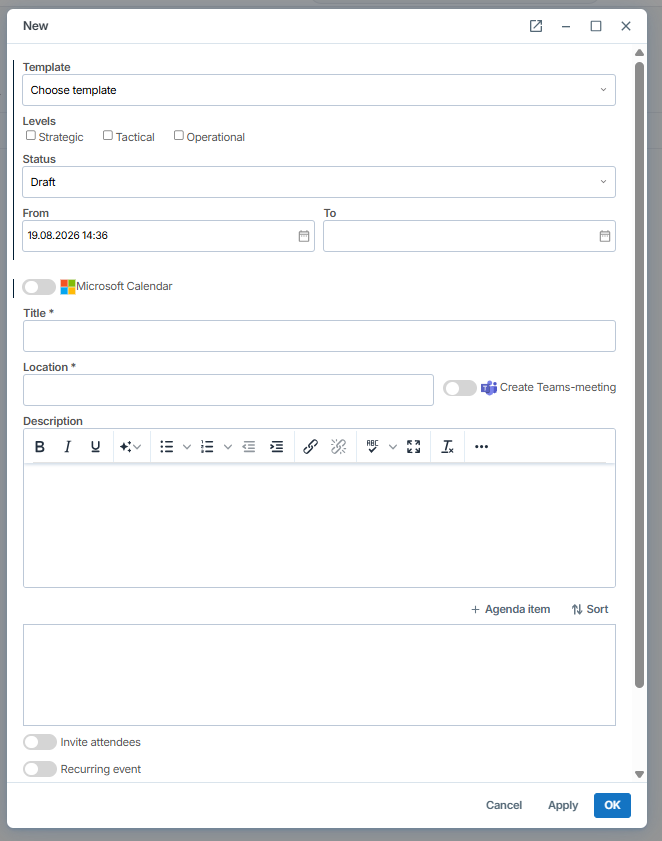
With the new Meeting module, you can:
- Create meeting templates in advance for recurring or standardized meeting formats.
- Define the meeting level by selecting Strategic, Tactical, or Operational.
- Set the meeting status to Draft or Published.
- Schedule the meeting by specifying a date and time.
- Integrate with Microsoft calendars to synchronize meeting invitations.
- Add a title to clearly identify the meeting.
- Specify a location or create a Microsoft Teams meeting for virtual participation.
- Add a description with relevant information and context.
- Create agenda items to structure the meeting and prepare discussion topics.
- Invite attendees directly to the meeting. You can add users, contacts or ENS+ groups, but you cannot currently add externals.
- Schedule recurring meetings for regular meetings and routines.
- Conduct the meeting in FACT24 CIM, using the prepared meeting information and agenda.
All meetings created in FACT24 CIM can be found in the Meeting Overview, providing a central place to access and manage your meetings.
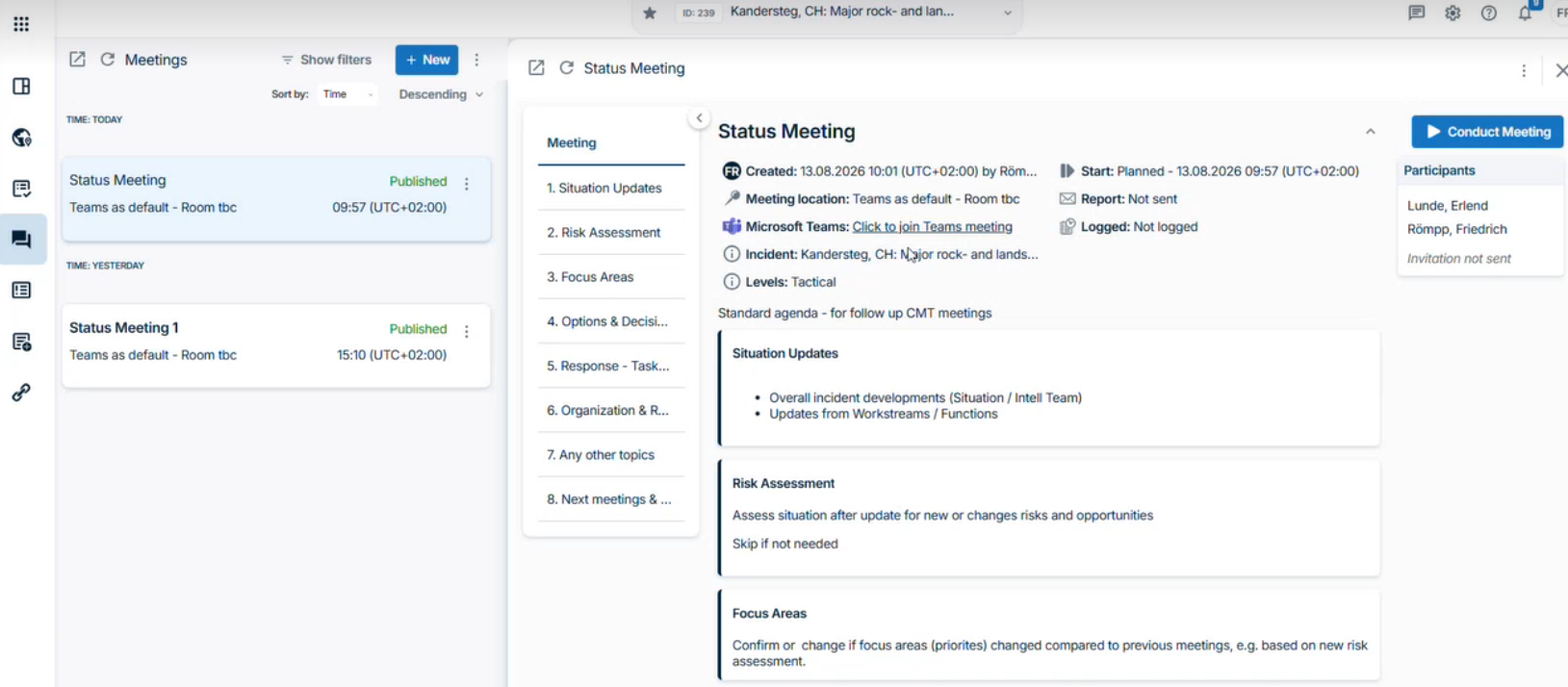
From the Meeting Overview, you can:
- View all your meetings in one central location
- Access meeting details, including date, time, location, participants, description, and agenda
- Conduct the meeting directly from FACT24 CIM
- Edit meeting details whenever changes are required
- Add additional participants to an existing meeting
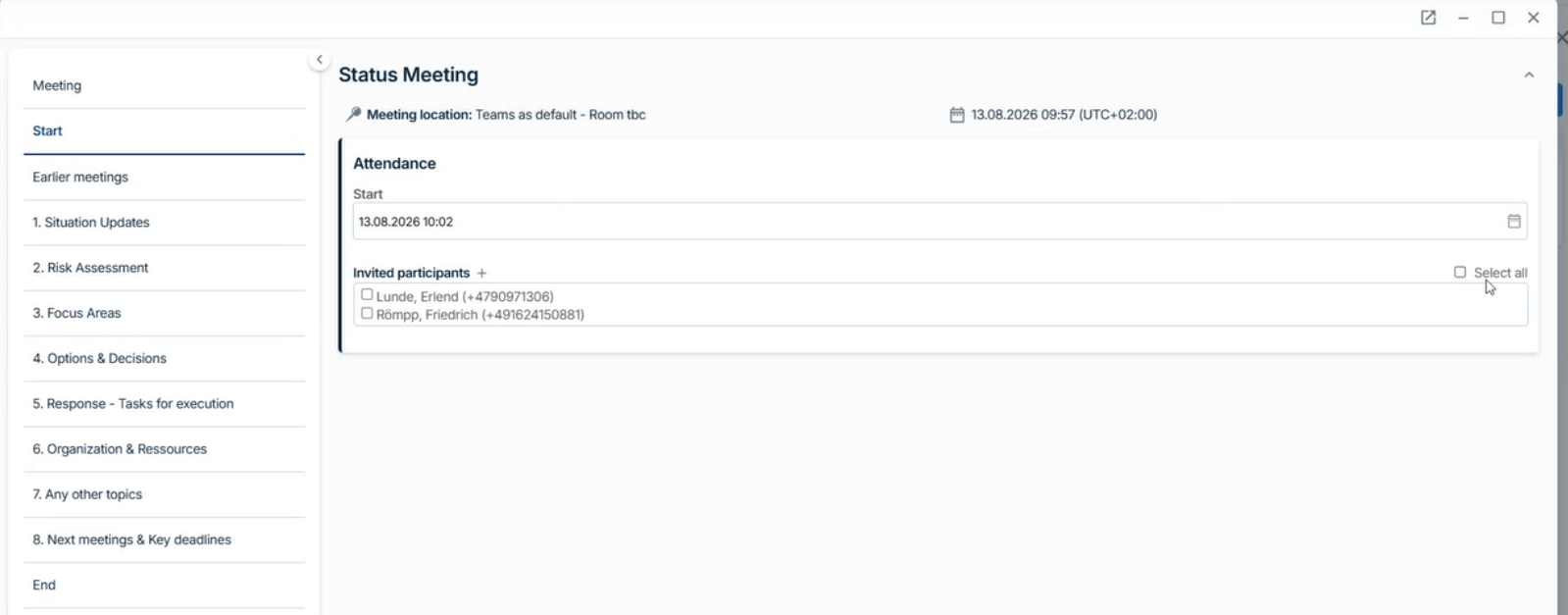
- Add attachments for each agenda point to provide relevant documents and additional information for the meeting
- Add tasks for each agenda point to capture and assign follow-up actions directly within the meeting
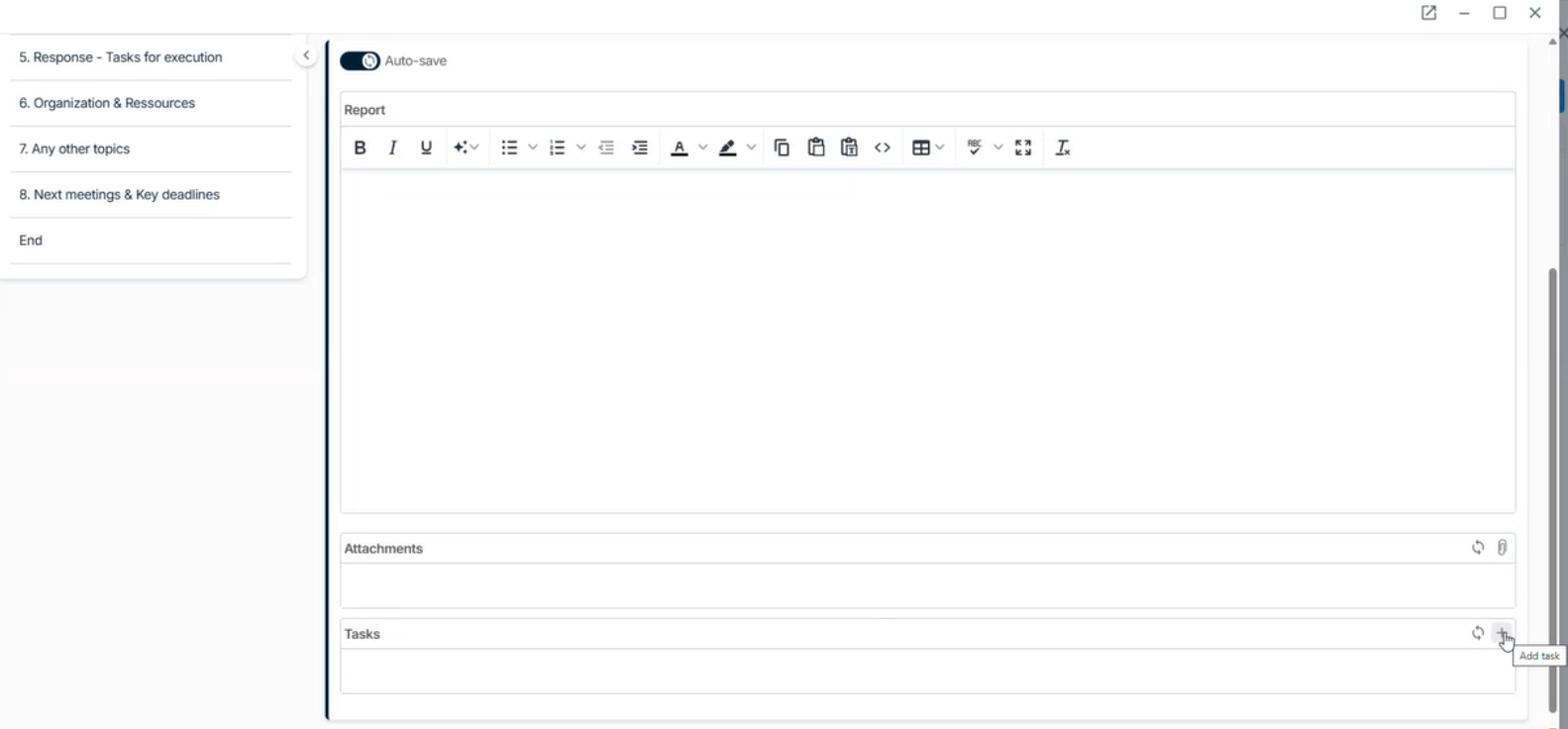
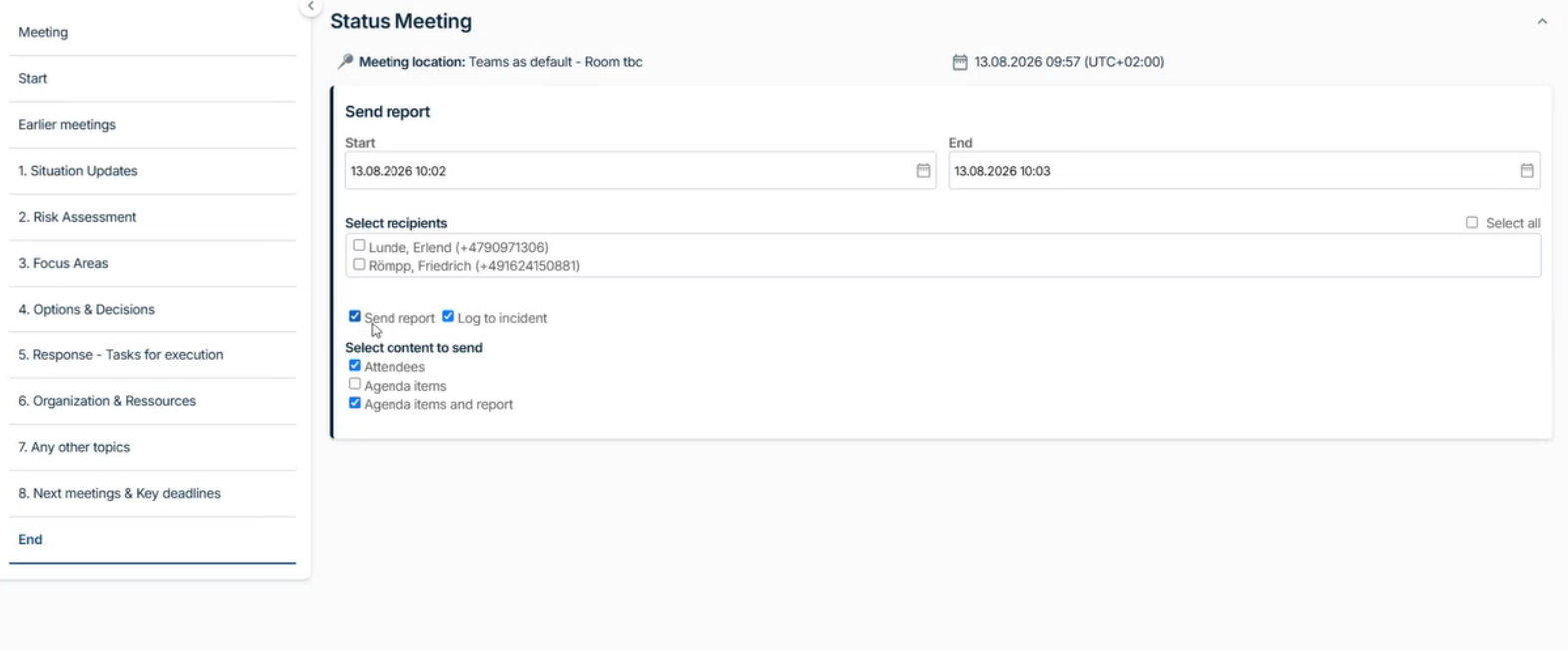
- Send a meeting report after the meeting has ended to share the relevant outcomes and information with participants or other stakeholders
- Log the meeting to the incident to ensure that the meeting and its outcomes are documented as part of the incident history