FACT24 ENS+
Release Notes
Portal Version 3.31
Portal Version 3.30
Portal Version 3.29
Portal Version 3.28
Portal Version 3.27
Portal Version 3.26
Portal Version 3.25
Portal Version 3.24
Portal Version 3.23
Portal Version 3.22
Portal Version 3.21
Portal Version 3.20
Portal Version 3.19
Portal Version 3.18
Portal Version 3.17
Portal Version 3.16
Portal Version 3.15
Portal Version 3.14
Portal Version 3.13
Portal Version 3.12
Portal Version 3.11
Portal Version 3.10
Portal Version 3.9
Portal Version 3.8
Portal Version 3.7
Portal Version 3.6
Portal Version 3.5
Portal Version 3.4
Portal Version 3.3
Portal Version 3.0
Portal Version 3.2
Getting started
Setup
Managing ENS+ users
Creating your organizational structure
Caller IDs
Address registry
Categories
Dictionary
File manager
Download Center
Your Account
Two-factor authentication (2FA)
Configuration
Persons & Groups
Alarm configuration
Alarms
Launch Forms - Configuration
Message templates
Calendar
Location profiles
Geolocation profiles
Whitelists
Jobs
Events
Telephone quickstarts
Survey
Alarm Templates
Alarm Flow
Interfaces
Operating Cockpit
Alarm Cockpit
Activate and stop alarm
Launch Forms - Trigger
Ad hoc alarm
Alarm monitor
Chat
Phone Conference
Video Conference
Surveys
Reports & Statistics
Loneworking
FACT24 Mediagateway
Microsoft Teams Bot
Web login for persons
Add-on modules
FACT24 ENS+ Incident Management
Telekom Settings Cloud of Things Narrow Band Interface
FACT24 ENS+ External API (REST) – Functionality Scope
FACT24 AI
Migration to ENS+
FACT24 CIM
Release Notes
New functions through FACT24 CIM release V.26.02
New functions through FACT24 CIM release V.26.01
New functions through FACT24 CIM release V.25.03
New functions through FACT24 CIM release V.25.02.01
New functions through FACT24 CIM release V.25.02
New functions through FACT24 CIM release V.25.01
New functions through FACT24 CIM release V.24.03
New functions through FACT24 CIM release V.24.02
New functions through FACT24 CIM release V.24.01
New functions through FACT24 CIM release V.23.02
New functions through FACT24 CIM release V.23.01
Getting started
FACT24 CIM starter - crucial steps
FACT24 CIM essential
FACT24 CIM advanced
Introduction
Start Page
Admin workspace
The FACT24 CIM Roles
New Navigation
Search
Levels
Contacts
Locations
Home - workspaces
Situation
Manage
Communicate
Document & report
Prepare & prevent
Mobile App (FACT24 ENS+ and CIM)
App Releases
App-Version 3.30
App-Version 3.28
App Version 3.26
App Version 3.24
App Version 3.22
App Version 3.21
App Version 3.20
App Version 3.17
App Version 3.16
App Version 3.15
App Version 3.13
App Version 3.12
App Version 3.10
App Version 3.9
App Version 3.8
App Version 3.7
App Version 3.5
App Version 3.3
App Version 3.2
Download & Basics
FACT24 ENS+ App Section
Basics and Login
General Settings
Account
Location Services
Group Management
Triggering Alarms
Editing Alarms
Active Alarms
Chat in the ENS+ Application
History
Reports
Emergency Plans
Lone Worker Protection
Special Smartphones
FACT24 CIM App Section
Support
Table of Contents
- All Categories
- FACT24 ENS+
- Release Notes
- Portal Version 3.25
Portal Version 3.25

Release Notes Portal Version 3.25.0 (available from December 03rd 2025 on)
Improvements for all FACT24 Editions
Easier access to Phone Conferences
Alarm notifications that include a conference call now contain both the standard phone number and the conference ID in addition to the existing quick link.
This ensures that even devices that do not support combined “quick link” numbers can still recognise and dial the conference number.
Example message format:
You can join the conference with the following number(s):
- Phone Number: +49 123 45678
- Conference ID: 456789
- Quick link: +4912345678,,456789#
Find out more about Phone Conferences here
Alarm report: Extended person details and exports
On the Person Details page in the Alarm Report, Qualification and Job Title can now be displayed simultaneously in the table.
Both fields are also included in the CSV and XLSX exports.

This improvement enables crisis teams to export the alarm report and, for example, immediately see which notified persons were ‘IT security specialists’ with specific certifications, so that no data from additional systems needs to be combined.
Find out more about Alarm Reports here
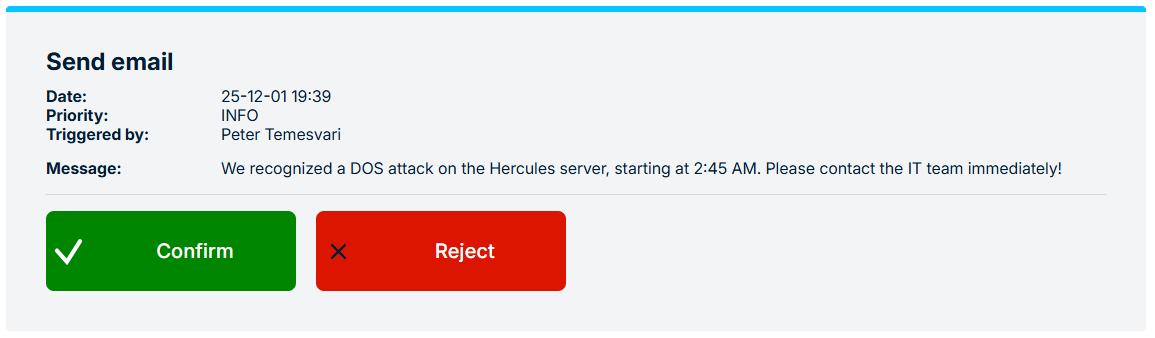
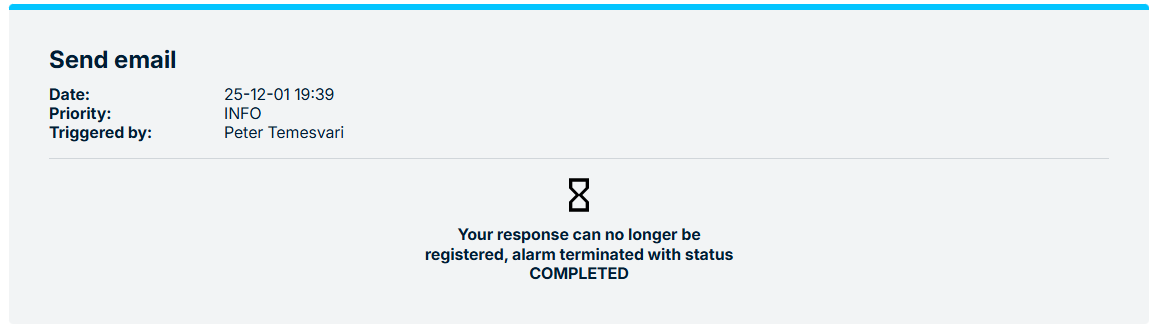
Increased security of the Confirmation Page
The alarm confirmation page continues to show the alarm text to provide context for the responder.
However, for security reasons, the alarm text is now only visible while the alarm is active.
Once the alarm has expired, the text is no longer accessible via the confirmation link.
This reduces the risk of sensitive alarm content being viewed later by unauthorised persons who might gain access to the link and supports compliance with internal security and data protection policies.
Find out more about Alarm Confirmations here
Multiple Roles of a Person
Since version 3.24, it has been possible to assign multiple roles to a FACT24 ENS+ User.
Each role has an associated scope, defining the organisational units for which the role is valid.
To ensure consistent and secure behaviour, users can now only assign scopes to others that are equal to or narrower than their own scope.
In practice, this means:
- Users with scope “Own org unit” can assign only “Own org unit”.
- Users with scope “Own and sub-org” can assign “Own and sub-org” and “Own org unit”.
- Users with scope “Whole enterprise” can assign all three scopes.
Find out more about Roles here
Improvements from FACT24 ENS+ essential:
More detailed Location Information for App Users
The FACT24 app now transmits multiple location sources when an alarm is triggered or confirmed.
If WiFi or Beacon positioning is enabled alongside GPS, both data types are sent to the system.
This enhancement provides greater precision in emergency situations for example, during a building incident on a large campus, the crisis team can receive both GPS and WiFi/Beacon-based location information when a user confirms an alarm on their smartphone, enabling them to identify not just the general campus area but the specific building the person is located in.
Find out more about Location Information here
Improvements from FACT24 ENS+ advanced:
New Variables for Alarm Messages
The set of variables available for use in alarm texts (introduced and expanded with v3.24) has been further extended.
You can now include:
- The address of the person triggering the alarm.
- Details of their communication channels (phone numbers, email addresses, etc.).
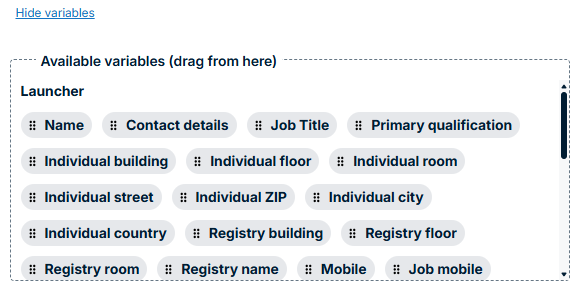
This enables more personalised and context-rich alarm messages and reduces the need to look up contact data in parallel systems during an incident.
Find out more about Alarm Messages here
Export Alarm Flow as PDF or SVG
Alarm flows can now be exported as PDF or SVG files.
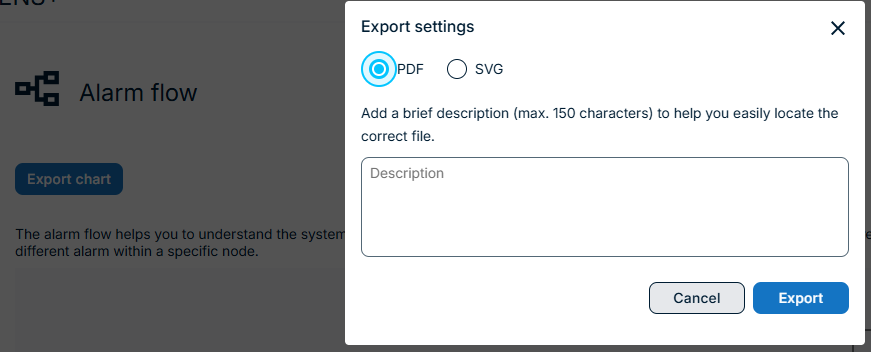
The exported files are made available via the Download Center.
This simplifies documentation & audit of alarm processes and enables easy sharing of alarm flows with stakeholders outside the ENS+ portal (e.g. management, auditors, external partners).